> ## Documentation Index
> Fetch the complete documentation index at: https://docs.deeprails.com/llms.txt
> Use this file to discover all available pages before exploring further.

# Quickstart Guide

> Get started with the Defend API in minutes.

### Create an API Key

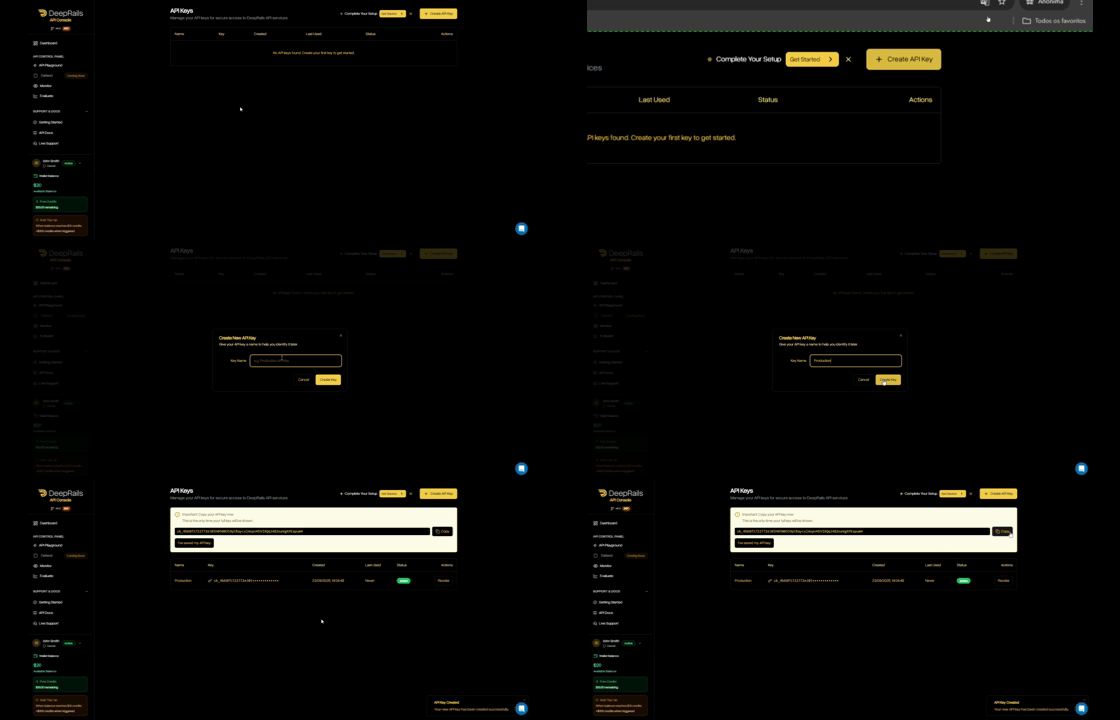
1. In your organization's DeepRails API Console, go to <a href="https://console.deeprails.com/settings/api-keys" target="_blank">API Keys</a>.<br />
2. Click <strong>Create key</strong>, name it, then copy the key.<br />
3. (Optional) Save it as the <code>DEEPRAILS\_API\_KEY</code> environment variable.<br />

<div className="flex justify-center">
  <Frame caption="Create and manage API keys in the API Console." className="p-1">
    <img alt="API Keys – placeholder" src="https://mintcdn.com/deeprails-479f3a7b/bbwR2lswB0faqCU8/images/api-key.gif?s=9035bfe5cc0b25ed5734ad5eb75397d0" width="560" height="240" data-path="images/api-key.gif" />
  </Frame>
</div>

### Install the SDK

<Tabs>
  <Tab title="Python">
    ```python theme={null}
    pip install deeprails
    ```
  </Tab>

  <Tab title="TypeScript / Node">
    ```ts theme={null}
    npm install deeprails
    ```
  </Tab>

  <Tab title="Ruby">
    ```Ruby theme={null}
    gem install deeprails
    ```
  </Tab>

  <Tab title="Go">
    ```go theme={null}
    go get github.com/deeprails/deeprails-go-sdk@latest
    ```
  </Tab>
</Tabs>

### Create your first Defend workflow

Before you can submit events to be evaluated and potentially remediated, you have to create and configure a workflow.<br /><br />
A workflow is an abstraction for a specific production use of Gen AI, and its configurations determine which guardrail metrics are evaluated, at what thresholds, and how issues are remediated.<br /><br />

#### Types of Workflows

Workflows can either have custom or automatic thresholds, set by the `threshold_type`. Automatic workflows have adaptive thresholds that change as events are recorded, starting at `low`, `medium`, or `high` values in an `automatic_hallucination_tolerance_levels` dictionary. Custom workflows have static, fully customizable thresholds for each selected metric set as floating point values in a `custom_hallucination_threshold_values` dictionary.<br /><br />
Note that workflows set to automatic must have `automatic_hallucination_tolerance_levels` specified and `custom_hallucination_threshold_values` is not needed, and vice versa for those set to custom.

<Tabs>
  <Tab title="Python">
    ```python theme={null}
    from deeprails import DeepRails

    # Initialize (env var DEEPRAILS_API_KEY is recommended)
    client = DeepRails(api_key="YOUR_API_KEY")

    workflow_response = client.defend.create_workflow(
        name="Test Workflow",
        description="A workflow used to test the DeepRails API",
        threshold_type="custom",
        custom_hallucination_threshold_values={
            "completeness": 0.85,
            "instruction_adherence": 0.75,
        },
        improvement_action="fixit",
        max_improvement_attempts=5,
        web_search=True,
        file_search=["file_xxxxxxxxxxxx"],
        context_awareness=True,
    )
    print(workflow_response)
    ```
  </Tab>

  <Tab title="TypeScript / Node">
    ```ts theme={null}
    import { DeepRails } from "deeprails";

    async function main() {
      // Initialize (env var DEEPRAILS_API_KEY is recommended)
      const client = new DeepRails(process.env.DEEPRAILS_API_KEY || "YOUR_API_KEY");

      const workflowResponse = await client.defend.createWorkflow({
        name: "Test Workflow",
        description: "A workflow used to test the DeepRails API",
        threshold_type: "custom",
        custom_hallucination_threshold_values: {
            completeness: 0.85,
            instruction_adherence: 0.75,
        },
        improvement_action: "fixit",
        max_improvement_attempts: 5,
        web_search: true,
        file_search: ["file_xxxxxxxxxxxx"],
        context_awareness: true,
      });

      console.log(workflowResponse);
    }

    main().catch(console.error);
    ```
  </Tab>

  <Tab title="Ruby">
    ```Ruby theme={null}
    require "deeprails"

    # Initialize (env var DEEPRAILS_API_KEY is recommended)
    deeprails = Deeprails::Client.new(
      api_key: ENV["DEEPRAILS_API_KEY"] || "YOUR_API_KEY"
    )

    workflow_response = deeprails.defend.create_workflow(
      name: "Test Workflow",
      description: "A workflow used to test the DeepRails API",
      threshold_type: "custom",
      custom_hallucination_threshold_values: {
          "completeness" => 0.85,
          "instruction_adherence" => 0.75,
      },
      improvement_action: "fixit",
      max_improvement_attempts: 5,
      web_search: true,
      file_search: ["file_xxxxxxxxxxxx"],
      context_awareness: true,
    )
    puts workflow_response
    ```
  </Tab>

  <Tab title="Go">
    ```go theme={null}
    package main

    import (
    	"context"
    	"fmt"
    	"log"
    	"github.com/deeprails/deeprails-go-sdk"
    	"github.com/deeprails/deeprails-go-sdk/option"
    )

    func main() {
    	apiKey := "YOUR_API_KEY"

      // NewClient will use the api key set under DEEPRAILS_API_KEY if option.WithAPIKey is not specified
    	client := deeprails.NewClient(option.WithAPIKey(apiKey))

    	workflow, err := client.Defend.NewWorkflow(
    		context.TODO(),
    		deeprails.DefendNewWorkflowParams{
          Name: deeprails.F("Test Workflow"),
          Description: deeprails.F("A workflow used to test the DeepRails API"),
    			ThresholdType: deeprails.F(deeprails.DefendNewWorkflowParamsThresholdTypeCustom),
    			CustomHallucinationThresholdValues: deeprails.F(map[string]float64{
    				"completeness":          0.850000,
    				"instruction_adherence": 0.750000,
    			}),
    			ImprovementAction: deeprails.F(deeprails.DefendNewWorkflowParamsImprovementActionFixit),
          MaxImprovementAttempts: deeprails.F(int64(5)),
          WebSearch: deeprails.F(true),
          FileSearch: deeprails.F([]string{"file_xxxxxxxxxxxx"}),
          ContextAwareness: deeprails.F(true),
        },
    	)

    	if err != nil {
    		log.Fatal(err)
    	}

    	fmt.Printf("Created workflow with ID: %s\n", workflow.WorkflowID)

    }
    ```
  </Tab>
</Tabs>

#### Required Parameters

| Field                            | Type   | Description                                                                                                                                                                                                                                                                              |
| -------------------------------- | ------ | ---------------------------------------------------------------------------------------------------------------------------------------------------------------------------------------------------------------------------------------------------------------------------------------- |
| <code>name</code>                | string | The name of the workflow.                                                                                                                                                                                                                                                                |
| <code>threshold\_type</code>     | string | The workflow type (either <code>automatic</code> or <code>custom</code>), which determines whether thresholds are specified by the user or set automatically.                                                                                                                            |
| <code>improvement\_action</code> | string | The remediation strategy when outputs fail guardrail metrics. <code>fixit</code> rewrites the failing output to pass the metrics. <code>regen</code> prompts the LLM to regenerate the output from scratch. <code>do\_nothing</code> records the failure without attempting remediation. |

#### Optional Parameters

| Field                                                    | Type      | Description                                                                                                                                                                                                                                                                                |
| -------------------------------------------------------- | --------- | ------------------------------------------------------------------------------------------------------------------------------------------------------------------------------------------------------------------------------------------------------------------------------------------ |
| <code>description</code>                                 | string    | A description of the use case of the workflow or other additional information.                                                                                                                                                                                                             |
| <code>custom\_hallucination\_threshold\_values</code>    | object    | The mapping of guardrail metrics to floating point threshold values (0.0-1.0). Required when <code>threshold\_type</code> is <code>custom</code>. This determines which metrics Defend will evaluate and how strict each threshold is.                                                     |
| <code>automatic\_hallucination\_tolerance\_levels</code> | object    | The mapping of guardrail metrics to tolerance levels (<code>low</code>, <code>medium</code>, or <code>high</code>). Required when <code>threshold\_type</code> is <code>automatic</code>. This determines which metrics Defend will evaluate and how strict the adaptive thresholds start. |
| <code>max\_improvement\_attempts</code>                  | integer   | The maximum number of improvement attempts to be applied to one workflow event before it is considered failed. Defaults to 10.                                                                                                                                                             |
| <code>web\_search</code>                                 | boolean   | Whether or not the extended AI capability, web search, is available to the evaluation and remediation models.                                                                                                                                                                              |
| <code>file\_search</code>                                | string\[] | A list of uploaded file IDs for the evaluation and remediation models to search using the extended AI capability, file search. Upload files first via <code>/files/upload</code>.                                                                                                          |
| <code>context\_awareness</code>                          | boolean   | Whether or not the extended AI capability, context awareness, is available to the evaluation and remediation models.                                                                                                                                                                       |

### Submit a Workflow Event

Use the SDK to log a production event (input + output). This creates a **workflow event** and automatically triggers an associated **evaluation** using the guardrail metrics you pass.<br /><br />
If the evaluation fails for one or more metrics, the improvement action specified for the affiliated workflow will be used to remediate the output. Then, that improved output will be evaluated and potentially improved again, if needed.<br /><br />
The improvement process will repeat for that event until all guardrails pass or the maximum number of retries is reached.

> Tip: You can also submit a workflow event via the <a href="https://console.deeprails.com/api-playground" target="_blank">DeepRails API Playground</a>.

<Tabs>
  <Tab title="Python">
    ```python theme={null}
    from deeprails import DeepRails

    # Initialize (env var DEEPRAILS_API_KEY is recommended)
    client = DeepRails(api_key="YOUR_API_KEY")

    event_response = client.defend.submit_event(
        workflow_id="wkfl_xxxxxxxxxxxx",
        model_input={
            "system_prompt": "You are a helpful tutor specializing in AP science classes.",
            "user_prompt": "Explain the difference between mitosis and meiosis in one sentence.",
            "ground_truth": "Mitosis produces two identical diploid daughter cells for growth and repair, while meiosis produces four genetically unique haploid gametes for sexual reproduction.",
            "context": [
                {"role": "user", "content": "I have an AP Bio exam tomorrow, can you help me study?"},
                {"role": "tutor", "content": "Sure, I'll help you study."}
            ]
        },
        model_output="Mitosis produces two genetically identical diploid cells for growth and tissue repair, whereas meiosis generates four genetically varied haploid gametes for sexual reproduction.",
        model_used="gpt-4o-mini",
        run_mode="precision",
        nametag="test",
    )
    print(event_response)
    ```
  </Tab>

  <Tab title="TypeScript / Node">
    ```ts theme={null}
    import { DeepRails } from "deeprails";

    async function main() {
      // Initialize (env var DEEPRAILS_API_KEY is recommended)
      const client = new DeepRails(process.env.DEEPRAILS_API_KEY || "YOUR_API_KEY");

      const eventResponse = await client.defend.submitEvent(
        "wkfl_xxxxxxxxxxxx",
        {
          model_input: {
            system_prompt: "You are a helpful tutor specializing in AP science classes.",
            user_prompt: "Explain the difference between mitosis and meiosis in one sentence.",
            ground_truth: "Mitosis produces two identical diploid daughter cells for growth and repair, while meiosis produces four genetically unique haploid gametes for sexual reproduction.",
            context: [
              { role: "user", content: "I have an AP Bio exam tomorrow, can you help me study?" },
              { role: "tutor", content: "Sure, I'll help you study." },
            ],
          },
          model_output: "Mitosis produces two genetically identical diploid cells for growth and tissue repair, whereas meiosis generates four genetically varied haploid gametes for sexual reproduction.",
          model_used: "gpt-4o-mini",
          run_mode: "precision",
          nametag: "test",
        }
      );

      console.log(eventResponse);
    }

    main().catch(console.error);
    ```
  </Tab>

  <Tab title="Ruby">
    ```Ruby theme={null}
    require "deeprails"

    # Initialize (env var DEEPRAILS_API_KEY is recommended)
    deeprails = Deeprails::Client.new(
      api_key: ENV["DEEPRAILS_API_KEY"] || "YOUR_API_KEY"
    )

    event_response = deeprails.defend.submit_event(
      "wkfl_xxxxxxxxxxxx",
      {
        model_input: {
          system_prompt: "You are a helpful tutor specializing in AP science classes.",
          user_prompt: "Explain the difference between mitosis and meiosis in one sentence.",
          ground_truth: "Mitosis produces two identical diploid daughter cells for growth and repair, while meiosis produces four genetically unique haploid gametes for sexual reproduction.",
          context: [
            { role: "user", content: "I have an AP Bio exam tomorrow, can you help me study?" },
            { role: "tutor", content: "Sure, I'll help you study." }
          ]
        },
        model_output: "Mitosis produces two genetically identical diploid cells for growth and tissue repair, whereas meiosis generates four genetically varied haploid gametes for sexual reproduction.",
        model_used: "gpt-4o-mini",
        run_mode: "precision",
        nametag: "test"
      }
    )
    puts event_response
    ```
  </Tab>

  <Tab title="Go">
    ```go theme={null}
    package main

    import (
    	"context"
    	"fmt"
    	"log"

    	"github.com/deeprails/deeprails-go-sdk"
    	"github.com/deeprails/deeprails-go-sdk/option"
    )

    func main() {
    	apiKey := "YOUR_API_KEY"

    	client := deeprails.NewClient(option.WithAPIKey(apiKey))

    	// Submit a workflow event
    	event, err := client.Defend.SubmitEvent(
    		context.TODO(),
    		"wkfl_xxxxxxxxxxxx",
    		deeprails.DefendSubmitEventParams{
    			ModelInput: deeprails.F(deeprails.DefendSubmitEventParamsModelInput{
            SystemPrompt: deeprails.F("You are a helpful tutor specializing in AP science classes."),
            UserPrompt: deeprails.F("Explain the difference between mitosis and meiosis in one sentence."),
            GroundTruth: deeprails.F("Mitosis produces two identical diploid daughter cells for growth and repair, while meiosis produces four genetically unique haploid gametes for sexual reproduction."),
            Context: deeprails.F([]string{
              "user: I have an AP Bio exam tomorrow, can you help me study?",
              "tutor: Sure, I'll help you study.",
            }),
    			}),
    		  ModelOutput: deeprails.F("Mitosis produces two genetically identical diploid cells for growth and tissue repair, whereas meiosis generates four genetically varied haploid gametes for sexual reproduction."),
    			ModelUsed:   deeprails.F("gpt-4o-mini"),
    			RunMode:     deeprails.F(deeprails.DefendSubmitEventParamsRunModePrecision),
    			Nametag:     deeprails.F("test"),
    		},
    	)

    	if err != nil {
    		log.Fatal(err)
    	}

    	fmt.Printf("%+v\n", event)
    }

    ```
  </Tab>
</Tabs>

#### Required Parameters

| Field                      | Type   | Description                                                                                                                                                                                                                                                                                                                                                                                                                                                                                                                         |
| -------------------------- | ------ | ----------------------------------------------------------------------------------------------------------------------------------------------------------------------------------------------------------------------------------------------------------------------------------------------------------------------------------------------------------------------------------------------------------------------------------------------------------------------------------------------------------------------------------- |
| <code>workflow\_id</code>  | string | The ID of the Defend workflow associated with this event. (find it in Console → Defend → Manage Workflows)                                                                                                                                                                                                                                                                                                                                                                                                                          |
| <code>model\_input</code>  | object | Your prompt + optional context. Must include at least a <code>user\_prompt</code>. See model\_input fields below.                                                                                                                                                                                                                                                                                                                                                                                                                   |
| <code>model\_output</code> | string | The LLM output to be evaluated and recorded with the event.                                                                                                                                                                                                                                                                                                                                                                                                                                                                         |
| <code>model\_used</code>   | string | The model used to generate the output, like <code>gpt-4o</code> or <code>o3</code>.                                                                                                                                                                                                                                                                                                                                                                                                                                                 |
| <code>run\_mode</code>     | string | Run mode for the workflow event that determines which models are used to evaluate the event. Available run modes (fastest to most thorough): <code>super\_fast</code>, <code>fast</code>, <code>precision</code>, <code>precision\_codex</code>, <code>precision\_max</code>, and <code>precision\_max\_codex</code>. Defaults to <code>fast</code>. Note: <code>super\_fast</code> does not support Web Search or File Search — if your workflow has these enabled, use a different run mode or edit the workflow to disable them. |

#### model\_input Fields

<table className="docs-auto-table">
  <thead>
    <tr>
      <th>Field</th>
      <th>Type</th>
      <th>Required</th>
      <th>Description</th>
    </tr>
  </thead>

  <tbody>
    <tr>
      <td><code>user\_prompt</code></td>
      <td>string</td>
      <td>Yes</td>
      <td>The user prompt sent to the LLM.</td>
    </tr>

    <tr>
      <td><code>system\_prompt</code></td>
      <td>string</td>
      <td>No</td>
      <td>The system prompt used to configure the LLM's behavior.</td>
    </tr>

    <tr>
      <td><code>ground\_truth</code></td>
      <td>string</td>
      <td>No</td>
      <td>The expected correct answer. Required when the workflow evaluates the <code>ground\_truth\_adherence</code> metric.</td>
    </tr>

    <tr>
      <td><code>context</code></td>
      <td>array</td>
      <td>No</td>
      <td>Structured context for the evaluation, such as conversation history or domain-specific facts. Each item should have <code>role</code> and <code>content</code> fields. Required when <code>context\_awareness</code> is enabled on the workflow.</td>
    </tr>
  </tbody>
</table>

#### Optional Parameters

| Field                | Type   | Description                       |
| -------------------- | ------ | --------------------------------- |
| <code>nametag</code> | string | A user-defined tag for the event. |

### Retrieve Workflow and Event Details

You can retrieve workflow details and fetch events from a specific workflow. Events are processed asynchronously, so you will need to poll using the event ID until the status is <code>Completed</code>.

<Tabs>
  <Tab title="Python">
    ```python theme={null}
    import time
    from deeprails import DeepRails

    # Initialize (env var DEEPRAILS_API_KEY is recommended)
    client = DeepRails(api_key="YOUR_API_KEY")

    WORKFLOW_ID = "wkfl_xxxxxxxxxxxx"
    EVENT_ID = "evt_xxxxxxxxxxxx"

    # Retrieve workflow details
    workflow_response = client.defend.retrieve_workflow(
        workflow_id=WORKFLOW_ID
    )
    print(workflow_response)

    # Poll event until completion
    event_response = None
    while True:
        event_response = client.defend.retrieve_event(
            workflow_id=WORKFLOW_ID,
            event_id=EVENT_ID,
        )
        if event_response.status == "Completed":
            break
        print(f"Event status: {event_response.status} — waiting...")
        time.sleep(2)

    # Check the improvement outcome
    tool_status = event_response.improvement_tool_status
    if tool_status == "improved":
        print(f"Improved model output: {event_response.improved_model_output}")
    elif tool_status == "improvement_failed":
        print("Improvement action failed to improve output")
    elif tool_status == "no_improvement_required":
        print("Improvement not needed!")
    ```
  </Tab>

  <Tab title="TypeScript / Node">
    ```ts theme={null}
    import { DeepRails } from "deeprails";

    async function main() {
      // Initialize (env var DEEPRAILS_API_KEY is recommended)
      const client = new DeepRails(process.env.DEEPRAILS_API_KEY || "YOUR_API_KEY");

      const WORKFLOW_ID = "wkfl_xxxxxxxxxxxx";
      const EVENT_ID = "evt_xxxxxxxxxxxx";

      // Retrieve workflow details
      const workflowResponse = await client.defend.retrieveWorkflow(WORKFLOW_ID);
      console.log(workflowResponse);

      // Poll event until completion
      let eventResponse: any = null;
      while (true) {
        eventResponse = await client.defend.retrieveEvent(WORKFLOW_ID, EVENT_ID);
        if (eventResponse.status === "Completed") break;
        console.log(`Event status: ${eventResponse.status} — waiting...`);
        await new Promise((resolve) => setTimeout(resolve, 2000));
      }

      // Check the improvement outcome
      const toolStatus = eventResponse.improvement_tool_status;
      if (toolStatus === "improved") {
        console.log(`Improved model output: ${eventResponse.improved_model_output}`);
      } else if (toolStatus === "improvement_failed") {
        console.log("Improvement action failed to improve output");
      } else if (toolStatus === "no_improvement_required") {
        console.log("Improvement not needed!");
      }
    }

    main().catch(console.error);
    ```
  </Tab>

  <Tab title="Ruby">
    ```Ruby theme={null}
    require "deeprails"

    # Initialize (env var DEEPRAILS_API_KEY is recommended)
    deeprails = Deeprails::Client.new(
      api_key: ENV["DEEPRAILS_API_KEY"] || "YOUR_API_KEY"
    )

    WORKFLOW_ID = "wkfl_xxxxxxxxxxxx"
    EVENT_ID = "evt_xxxxxxxxxxxx"

    # Retrieve workflow details
    workflow_response = deeprails.defend.retrieve_workflow(WORKFLOW_ID)
    puts workflow_response

    # Poll event until completion
    event_response = nil
    loop do
      event_response = deeprails.defend.retrieve_event(EVENT_ID, workflow_id: WORKFLOW_ID)
      break if event_response.status == "Completed"
      puts "Event status: #{event_response.status} — waiting..."
      sleep(2)
    end

    # Check the improvement outcome
    tool_status = event_response.improvement_tool_status
    if tool_status == "improved"
      puts "Improved model output: #{event_response.improved_model_output}"
    elsif tool_status == "improvement_failed"
      puts "Improvement action failed to improve output"
    elsif tool_status == "no_improvement_required"
      puts "Improvement not needed!"
    end
    ```
  </Tab>

  <Tab title="Go">
    ```go theme={null}
    package main

    import (
    	"context"
    	"fmt"
    	"log"
    	"time"

    	"github.com/deeprails/deeprails-go-sdk"
    	"github.com/deeprails/deeprails-go-sdk/option"
    )

    func main() {
    	apiKey := "YOUR_API_KEY"

    	client := deeprails.NewClient(option.WithAPIKey(apiKey))

    	WORKFLOW_ID := "wkfl_xxxxxxxxxxxx"
    	EVENT_ID := "evt_xxxxxxxxxxxx"

    	// Retrieve workflow details
    	workflow, err := client.Defend.GetWorkflow(
    		context.TODO(),
    		WORKFLOW_ID,
    		deeprails.DefendGetWorkflowParams{},
    	)
    	if err != nil {
    		log.Fatal(err)
    	}

    	fmt.Printf("%+v\n", workflow)

    	// Poll event until completion
    	var event *deeprails.WorkflowEventDetailResponse
    	for {
    		event, err = client.Defend.GetEvent(
    			context.TODO(),
    			WORKFLOW_ID,
    			EVENT_ID,
    		)
    		if err != nil {
    			log.Fatal(err)
    		}
    		if string(event.Status) == "Completed" {
    			break
    		}
    		fmt.Printf("Event status: %s — waiting...\n", event.Status)
    		time.Sleep(2 * time.Second)
    	}

    	// Check the improvement outcome
    	toolStatus := event.ImprovementToolStatus
    	if toolStatus == "improved" {
    		fmt.Printf("Improved model output: %s\n", event.ImprovedModelOutput)
    	} else if toolStatus == "improvement_failed" {
    		fmt.Println("Improvement action failed to improve output")
    	} else if toolStatus == "no_improvement_required" {
    		fmt.Println("Improvement not needed!")
    	}
    }

    ```
  </Tab>
</Tabs>

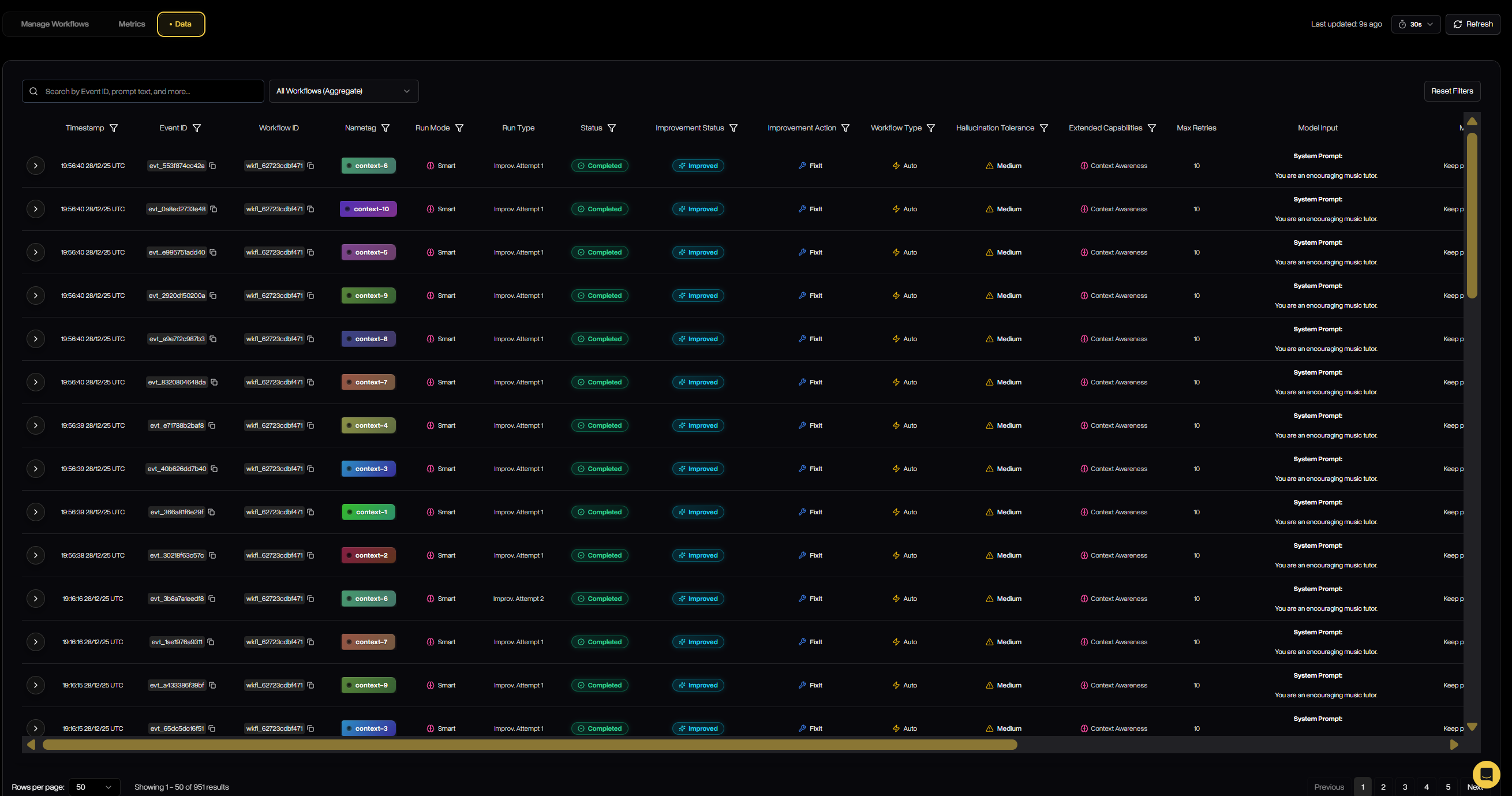
### Check Defend Outcomes via the API Console

1. Open <a href="https://console.deeprails.com/defend#defend-data" target="_blank">DeepRails API Console → Defend → Data</a>.<br />
2. Filter by time range or search by <code>workflow\_id</code> or <code>nametag</code> to find events.<br />
3. Open any event to see guardrail scores and remediation chains (FixIt/ReGen).<br />

<Frame caption="Browse real-time Defend events, filters, and remediation details in the Defend API Control Panel.">
  <img alt="Defend data – placeholder" src="https://mintcdn.com/deeprails-479f3a7b/KdzBGLVi0OKvQaB4/images/defend_data.png?fit=max&auto=format&n=KdzBGLVi0OKvQaB4&q=85&s=daa76d2d24a7da865b97bc8fafa82dff" width="2620" height="1379" data-path="images/defend_data.png" />
</Frame>

### Next Steps

<CardGroup cols={2}>
  <Card horizontal title="Configure Guardrails" icon="shield-check" href="/guardrails/metrics-overview">
    Explore the metrics behind evaluations—correctness, safety, completeness, and more.
  </Card>

  <Card horizontal title="Defend Overview" icon="swords" href="/defend/overview">
    Learn how workflows, metrics, and remediation work together.
  </Card>
</CardGroup>