> ## Documentation Index
> Fetch the complete documentation index at: https://docs.deeprails.com/llms.txt
> Use this file to discover all available pages before exploring further.
# Quickstart Guide
> Get started with the Monitor API in minutes.
### Create an API Key
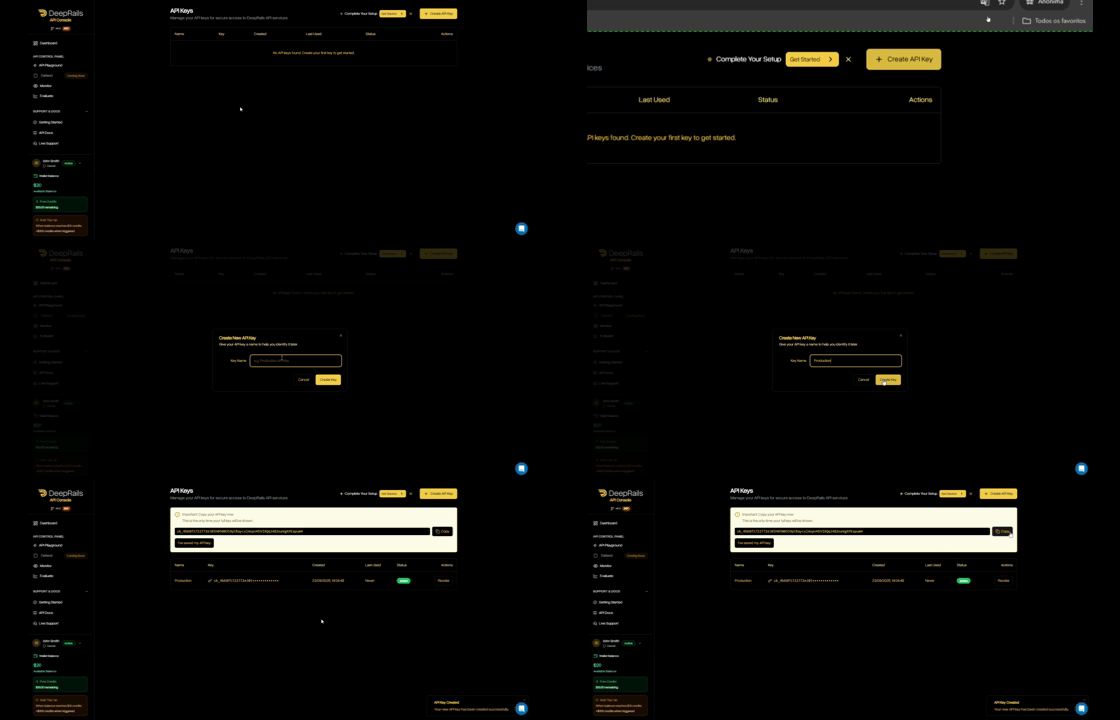
1. In your organization’s DeepRails API Console, go to API Keys.
2. Click Create key, name it, then copy the key.
3. (Optional) Save it as the DEEPRAILS\_API\_KEY environment variable.
### Install the SDK
```python theme={null}
pip install deeprails
```
```ts theme={null}
npm install deeprails
```
```Ruby theme={null}
gem install deeprails
```
```go theme={null}
go get github.com/deeprails/deeprails-go-sdk@latest
```
### Create a Monitor
Before you can send events, you need to create a monitor. A monitor is a container for tracking production events and their evaluations. In this example, the evaluations in the monitor will leverage a file as context, which will need to be uploaded first.
> Tip: You can also create a monitor via the DeepRails API Console.
```python theme={null}
from deeprails import DeepRails, omit
# Initialize (env var DEEPRAILS_API_KEY is recommended)
client = DeepRails(api_key="YOUR_API_KEY")
try:
with open("example.txt", "rb") as file:
file_response = client.post(
"/files/upload",
cast_to=object,
files={"files": file},
options={"headers": {"Content-Type": omit}},
)
file_item = file_response[0] if isinstance(file_response, list) and file_response else file_response
file_id = file_item.get("file_id") if isinstance(file_item, dict) else None
if not file_id:
raise ValueError("File upload failed")
# Create a monitor
monitor = client.monitor.create(
name="Production Chat Assistant Monitor",
description="Monitoring our production chatbot responses",
guardrail_metrics=[
"completeness",
"correctness"
],
web_search=True,
file_search=[
file_id
],
context_awareness=True,
)
print(f"Monitor created:\n{monitor}")
except Exception as e:
print(f"Error: {e}")
```
```ts theme={null}
import DeepRails from "deeprails";
import * as fs from "fs";
async function main() {
// Initialize (env var DEEPRAILS_API_KEY is recommended)
const client = new DeepRails({
apiKey: process.env.DEEPRAILS_API_KEY ?? "YOUR_API_KEY",
});
try {
const fileStream = fs.createReadStream("example.txt");
const files = [fileStream] as unknown as string[];
const fileResponse = await client.files.upload({ files } as any);
const fileItem = Array.isArray(fileResponse) ? fileResponse[0] : fileResponse;
if (!fileItem?.file_id) {
throw new Error("File upload failed");
}
const fileId = fileItem.file_id;
// Create a monitor
const monitor = await client.monitor.create({
name: "Production Chat Assistant Monitor",
description: "Monitoring our production chatbot responses",
guardrail_metrics: ["completeness", "correctness"],
web_search: true,
file_search: [fileId],
context_awareness: true,
});
console.log("Monitor created:", monitor);
} catch (e) {
console.error(`Error: ${e}`);
}
}
main().catch(console.error);
```
```Ruby theme={null}
require "deeprails"
# Initialize (env var DEEPRAILS_API_KEY is recommended)
client = Deeprails::Client.new(
api_key: ENV["DEEPRAILS_API_KEY"] || "YOUR_API_KEY"
)
begin
file_response = client.files.upload(
files: [File.open("example.txt")]
)
file_item = file_response.is_a?(Array) ? file_response.first : file_response
file_id = file_item.respond_to?(:file_id) ? file_item.file_id : file_item["file_id"]
raise "File upload failed" if file_id.to_s.empty?
# Create a monitor
monitor = client.monitor.create(
name: "Production Chat Assistant Monitor",
description: "Monitoring our production chatbot responses",
guardrail_metrics: [
"completeness",
"correctness"
],
web_search: true,
file_search: [
file_id
],
context_awareness: true,
)
puts "Monitor created:\n#{monitor}"
rescue => e
puts "Error: #{e.message}"
end
```
```go theme={null}
package main
import (
"bytes"
"context"
"encoding/json"
"fmt"
"io"
"log"
"mime/multipart"
"net/http"
"os"
"github.com/deeprails/deeprails-go-sdk"
"github.com/deeprails/deeprails-go-sdk/option"
)
func uploadFile(apiKey, path string) (string, error) {
file, err := os.Open(path)
if err != nil {
return "", err
}
defer file.Close()
body := &bytes.Buffer{}
writer := multipart.NewWriter(body)
part, err := writer.CreateFormFile("files", file.Name())
if err != nil {
return "", err
}
if _, err := io.Copy(part, file); err != nil {
return "", err
}
if err := writer.Close(); err != nil {
return "", err
}
req, err := http.NewRequest(http.MethodPost, "https://api.deeprails.com/files/upload", body)
if err != nil {
return "", err
}
req.Header.Set("Authorization", "Bearer "+apiKey)
req.Header.Set("Content-Type", writer.FormDataContentType())
resp, err := http.DefaultClient.Do(req)
if err != nil {
return "", err
}
defer resp.Body.Close()
if resp.StatusCode >= http.StatusBadRequest {
return "", fmt.Errorf("file upload failed with status %s", resp.Status)
}
var fileResponses []deeprails.FileResponse
if err := json.NewDecoder(resp.Body).Decode(&fileResponses); err != nil {
return "", err
}
if len(fileResponses) == 0 || fileResponses[0].FileID == "" {
return "", fmt.Errorf("file upload failed")
}
return fileResponses[0].FileID, nil
}
func main() {
apiKey := "YOUR_API_KEY"
client := deeprails.NewClient(option.WithAPIKey(apiKey))
fileID, err := uploadFile(apiKey, "example.txt")
if err != nil {
log.Fatal(err)
}
// Create a monitor
monitorResponse, err := client.Monitor.New(context.TODO(), deeprails.MonitorNewParams{
Name: deeprails.F("Production Chat Assistant Monitor"),
Description: deeprails.F("Monitoring our production chatbot responses"),
GuardrailMetrics: deeprails.F([]deeprails.MonitorNewParamsGuardrailMetric{
deeprails.MonitorNewParamsGuardrailMetricCorrectness,
deeprails.MonitorNewParamsGuardrailMetricCompleteness,
}),
WebSearch: deeprails.F(true),
FileSearch: deeprails.F([]string{fileID}),
ContextAwareness: deeprails.F(true),
})
if err != nil {
log.Fatal(err)
}
fmt.Printf("Monitor created with ID: %s\n", monitorResponse.MonitorID)
}
```
#### Required Parameters
| Field | Type | Description |
| ------------------------------- | --------- | ------------------------------------------------------------------------------------------- |
| name | string | The human-readable name of the monitor |
| guardrail\_metrics | string\[] | A list of one or more metrics that events associated with this monitor will be evaluated on |
#### Optional Parameters
| Field | Type | Description |
| ------------------------------- | --------- | ------------------------------------------------------------------------------------------------------------------------------------------------------------------------------------------- |
| description | string | A description of the monitor and/or the associated production use case |
| web\_search | boolean | Whether or not web search is added as an extended capability for this monitor's evaluations. Defaults to false |
| file\_search | string\[] | A list of uploaded file IDs to be used for file search in this monitor's evaluations. Upload files first via /files/upload. If nothing is passed, file search will not be used |
| context\_awareness | boolean | Whether or not context awareness is added as an extended capability for this monitor's evaluations. Defaults to false |
### Send Your First Monitor Event
Use the SDK to log a production event (input + output). The SDK automatically triggers an **evaluation** of the guardrail metrics assigned to the monitor and links the result to the event.
Retrieve the details of the event until it gives a `completed` status; then, you can view the outcome of the evaluation.
```python theme={null}
from deeprails import DeepRails
import time
# Initialize (env var DEEPRAILS_API_KEY is recommended)
client = DeepRails(api_key="YOUR_API_KEY")
# Create a monitor event (get the monitor_id from Console → Monitors)
created = client.monitor.submit_event(
monitor_id="mon_xxxxxxxxxxxx",
model_input={
"system_prompt": "You are a helpful tutor specializing in AP science classes.",
"user_prompt": "Explain the difference between mitosis and meiosis in one sentence.",
"context": [{"role": "user", "content": "I have an AP Bio exam tomorrow, can you help me study?"}, {"role": "tutor", "content": "Sure, I'll help you study."}]
},
model_output="Mitosis produces two genetically identical diploid cells for growth and tissue repair, whereas meiosis generates four genetically varied haploid gametes for sexual reproduction.",
run_mode="fast",
)
print(created)
time.sleep(5)
status = ""
while status != "completed":
time.sleep(1)
event = client.monitor.retrieve_event(event_id=created.event_id, monitor_id=created.monitor_id)
status = event.status
print(event.evaluation_result)
```
```ts theme={null}
import DeepRails from "deeprails";
async function main() {
// Initialize (env var DEEPRAILS_API_KEY is recommended)
const client = new DeepRails({
apiKey: process.env.DEEPRAILS_API_KEY ?? "YOUR_API_KEY",
});
// Create a monitor event (get the monitor_id from Console → Monitors)
const created = await client.monitor.submitEvent(
"mon_xxxxxxxxxxxx",
{
model_input: {
system_prompt: "You are a helpful tutor specializing in AP science classes.",
user_prompt: "Explain the difference between mitosis and meiosis in one sentence.",
context: [
{ role: "user", content: "I have an AP Bio exam tomorrow, can you help me study?" },
{ role: "tutor", content: "Sure, I'll help you study." }
],
},
model_output: "Mitosis produces two genetically identical diploid cells for growth and tissue repair, whereas meiosis generates four genetically varied haploid gametes for sexual reproduction.",
run_mode: "fast",
}
);
console.log(created);
await new Promise(resolve => setTimeout(resolve, 5000));
let status = "";
let event;
while (status !== "completed") {
await new Promise(resolve => setTimeout(resolve, 1000));
event = await client.monitor.retrieveEvent(created.event_id, {
monitor_id: created.monitor_id,
});
status = event.status ?? "";
}
console.log(event?.evaluation_result);
}
main().catch(console.error);
```
```Ruby theme={null}
require "deeprails"
# Initialize (env var DEEPRAILS_API_KEY is recommended)
client = Deeprails::Client.new(
api_key: ENV["DEEPRAILS_API_KEY"] || "YOUR_API_KEY"
)
# Create a monitor event (get the monitor_id from Console → Monitors)
created = client.monitor.submit_event(
"mon_xxxxxxxxxxxx",
{
model_input: {
system_prompt: "You are a helpful tutor specializing in AP science classes.",
user_prompt: "Explain the difference between mitosis and meiosis in one sentence.",
context: [
{ role: "user", content: "I have an AP Bio exam tomorrow, can you help me study?" },
{ role: "tutor", content: "Sure, I'll help you study." }
]
},
model_output: "Mitosis produces two genetically identical diploid cells for growth and tissue repair, whereas meiosis generates four genetically varied haploid gametes for sexual reproduction.",
run_mode: "fast",
}
)
puts created
sleep(5)
status = nil
while status != :completed
sleep(1)
event = client.monitor.retrieve_event(created.event_id, monitor_id: created.monitor_id)
status = event.status
end
puts event.evaluation_result
```
```go theme={null}
package main
import (
"context"
"fmt"
"log"
"time"
"github.com/deeprails/deeprails-go-sdk"
"github.com/deeprails/deeprails-go-sdk/option"
)
func main() {
apiKey := "YOUR_API_KEY"
client := deeprails.NewClient(option.WithAPIKey(apiKey))
// Create a monitor event (get the monitor_id from Console → Monitors)
created, err := client.Monitor.SubmitEvent(context.TODO(),
"mon_xxxxxxxxxxxx",
deeprails.MonitorSubmitEventParams{
ModelInput: deeprails.F(deeprails.MonitorSubmitEventParamsModelInput{
SystemPrompt: deeprails.F("You are a helpful tutor specializing in AP science classes."),
UserPrompt: deeprails.F("Explain the difference between mitosis and meiosis in one sentence."),
Context: deeprails.F([]deeprails.MonitorSubmitEventParamsModelInputContext{
{Role: deeprails.F("user"), Content: deeprails.F("I have an AP Bio exam tomorrow, can you help me study?")},
{Role: deeprails.F("tutor"), Content: deeprails.F("Sure, I'll help you study.")},
}),
}),
ModelOutput: deeprails.F("Mitosis produces two genetically identical diploid cells for growth and tissue repair, whereas meiosis generates four genetically varied haploid gametes for sexual reproduction."),
RunMode: deeprails.F(deeprails.MonitorSubmitEventParamsRunModeFast),
},
)
if err != nil {
log.Fatal(err)
}
fmt.Printf("Event created: %+v\n", created)
time.Sleep(5 * time.Second)
var event *deeprails.MonitorEventDetailResponse
for event == nil || event.Status != deeprails.MonitorEventDetailResponseStatusCompleted {
time.Sleep(1 * time.Second)
var err error
event, err = client.Monitor.GetEvent(context.TODO(), created.MonitorID, created.EventID)
if err != nil {
log.Fatal(err)
}
}
fmt.Printf("Evaluation Result:\n%+v\n", event.EvaluationResult)
}
```
#### Required Parameters
| Field | Type | Description |
| -------------------------- | ------ | -------------------------------------------------------------------------------------------- |
| monitor\_id | string | The ID of the monitor to receive the event (find it in Console → Monitor → Manage Monitors). |
| model\_input | object | Must include at least a user\_prompt. |
| model\_output | string | The LLM output to be evaluated and recorded with the event. |
#### Optional Parameters
| Field | Type | Description |
| ---------------------- | ------ | -------------------------------------------------------------------------------------------------------------------------------------------------------------------------------------------------------------------------------------------------------------------------------------------------------------------------------------------------------------------------------------------------------------------------------------------------------------------------------------------------------------------------------- |
| run\_mode | string | Run mode for the monitor event that determines which models are used to evaluate the event. Available run modes (fastest to most thorough): super\_fast, fast, precision, precision\_codex, precision\_max, and precision\_max\_codex. Defaults to fast. Note: super\_fast does not support Web Search or File Search — if your monitor has these enabled, use a different run mode or edit the monitor to disable them. |
### Retrieve Monitor and Event Details
You can retrieve a monitor's details via API including a list of recent events and stats on associated evaluation progress.
```python theme={null}
from deeprails import DeepRails
client = DeepRails(api_key="YOUR_API_KEY")
try:
# Get monitor details
monitor = client.monitor.retrieve(monitor_id="mon_xxxxxxxxxxxx")
print(monitor)
except Exception as e:
print(f"Error: {e}")
```
```ts theme={null}
import DeepRails from "deeprails";
async function main() {
const client = new DeepRails({
apiKey: process.env.DEEPRAILS_API_KEY ?? "YOUR_API_KEY",
});
try {
// Get monitor details
const monitor = await client.monitor.retrieve("mon_xxxxxxxxxxxx");
console.log(monitor);
} catch (e) {
console.error(`Error: ${e}`);
}
}
main().catch(console.error);
```
```Ruby theme={null}
require "deeprails"
client = Deeprails::Client.new(
api_key: ENV["DEEPRAILS_API_KEY"] || "YOUR_API_KEY"
)
begin
# Get monitor details
monitor = client.monitor.retrieve("mon_xxxxxxxxxxxx")
puts monitor
rescue => e
puts "Error: #{e.message}"
end
```
```go theme={null}
package main
import (
"context"
"fmt"
"log"
"github.com/deeprails/deeprails-go-sdk"
"github.com/deeprails/deeprails-go-sdk/option"
)
func main() {
apiKey := "YOUR_API_KEY"
client := deeprails.NewClient(option.WithAPIKey(apiKey))
// Get monitor details
monitor, err := client.Monitor.Get(context.TODO(), "mon_xxxxxxxxxxxx", deeprails.MonitorGetParams{})
if err != nil {
log.Fatal(err)
}
fmt.Printf("%+v\n", monitor)
}
```
### Check Monitor Analytics via the API Console
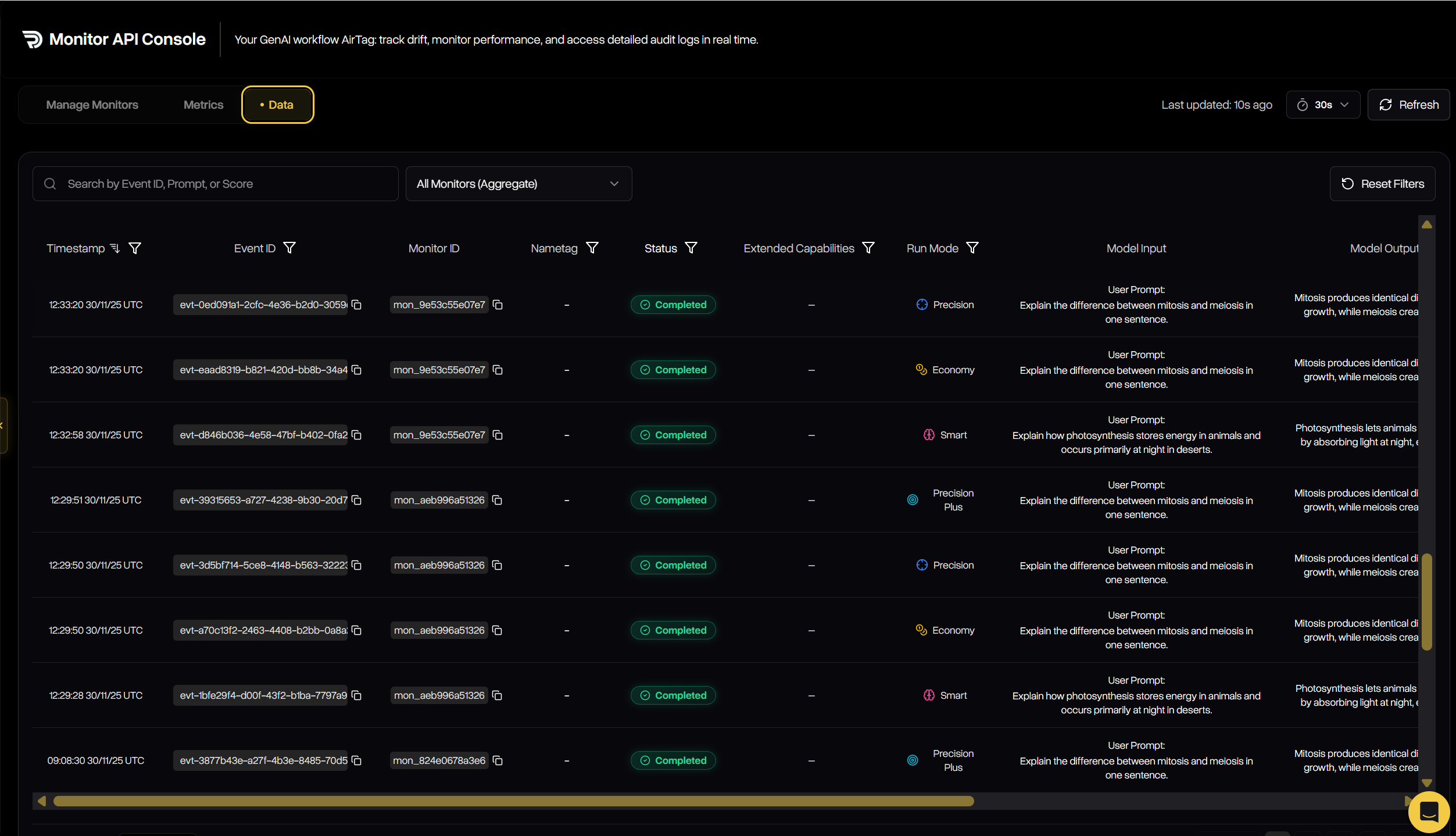
1. Open DeepRails API Console → Monitor → Data.
2. Filter by model, time range, or search by monitor\_id to find events.
3. Open any event to see the linked evaluation scores and rationales.
 ### Next Steps
Explore the metrics behind evaluations—correctness, safety, completeness, and more.
Learn core Monitor concepts and how it fits into your flow.
### Next Steps
Explore the metrics behind evaluations—correctness, safety, completeness, and more.
Learn core Monitor concepts and how it fits into your flow.