
How Defend Identifies Hallucinations
- Users can customize each workflow by selecting guardrail metrics for its evaluations and either setting custom thresholds per metric or enabling DeepRails’ automatic detection at either high, medium, or low tolerance.
- Defend compares each metric’s score to its configured hallucination threshold. If all metrics meet or exceed their thresholds, the output passes. If any metric falls below its threshold, the output is labeled a hallucination.
- Hallucinations detected in evaluations drive remediation for the failed metrics. Based on the workflow’s improvement action (FixIt, ReGen, or Do Nothing) and retry limit, Defend attempts to improve the output and re-evaluates until all metrics pass or the retry budget is exhausted.
- DeepRails uses Multimodal Partitioned Evaluation to more intelligently analyze outputs, using two evaluation models in parallel to greatly reduce the chance of hallucinations being missed.
What Happens to Hallucinations
When Defend detects a hallucination, it sends the output to remediation using the workflow’s selected improvement tool (learn more about improvement tools in the Defend Overview). The improved output is re-evaluated as soon as the tool finishes, as if it was a new event, completely independent of the original input/output pair. This evaluation-remediation cycle continues until all selected metrics pass or the workflow’s max retries are reached. DeepRails Defend uses Assumed Pass logic to reduce cost and latency: after a retry, only the metrics that failed in the previous output are re-evaluated. Scores and rationales for metrics that already passed are carried over to subsequent improvement attempts. This keeps remediation fast and efficient even when outputs have persistent hallucinations.The Impact of Run Modes
All of DeepRails’ evaluations are affected by the selected run mode (all run modes and more details about them are listed here). Run modes like Precision Max and Precision Max Codex use advanced reasoning models, incurring more cost and latency, while Fast uses more balanced and cost effective models. The more expensive run modes are more consistent both at detecting hallucinations and providing higher quality improvements. Higher quality hallucination detection and correction are worth the cost and latency for many applications, so experiment with different run modes before finalizing workflow configurations.Threshold Types
DeepRails offers two types of hallucination thresholds in Defend: automatic tolerances or custom thresholds. Automatic workflows are designed for easy use, while custom thresholds give experienced users more control.Automatic Tolerances
- Choose qualitative tolerance levels (
low,medium, orhigh) per guardrail usingautomatic_hallucination_tolerance_levels. - DeepRails translates each tolerance into numeric thresholds and adapts them based on workflow performance as more events are recorded.
- Best for fast setup or evolving prompts.
| Tolerance | Behavior | When to Use |
|---|---|---|
low | Lenient thresholds that allow for more creative or exploratory outputs while still filtering obvious failures. | Early prototyping, creative writing, or low-risk internal tools. |
medium | Balanced thresholds tuned for general production use; catches most issues without over-blocking. | Default choice for new workflows and broad user-facing assistants. |
high | Strict thresholds that only accept high-quality, confident outputs. | Regulated domains, compliance-heavy workflows, or scenarios with near-zero tolerance for hallucinations. |
Custom Thresholds
- Provide numeric cutoffs (0.0–1.0) for each metric in console or via API.
- Thresholds remain fixed until you change them, giving maximum control for regulated or benchmarked use cases.
- Best when you are familiar with DeepRails and your use case, and you know the minimum acceptable scores for your chosen metrics.
What a Hallucination Looks Like
You can view all evaluations for your Monitors and Defend workflows on their respective data tabs, Monitor Data and Defend Data.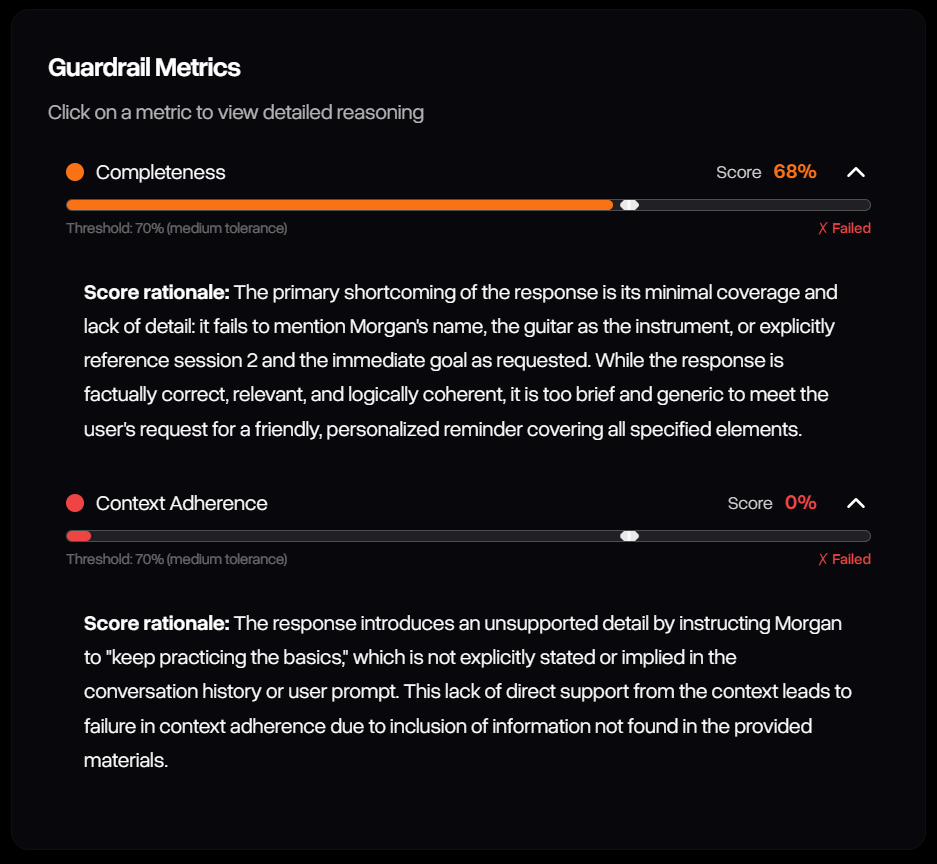
The details for an evaluation in Defend Data show the output's performance on each metric compared to its configured threshold, with hallucinations highlighted in red or orange
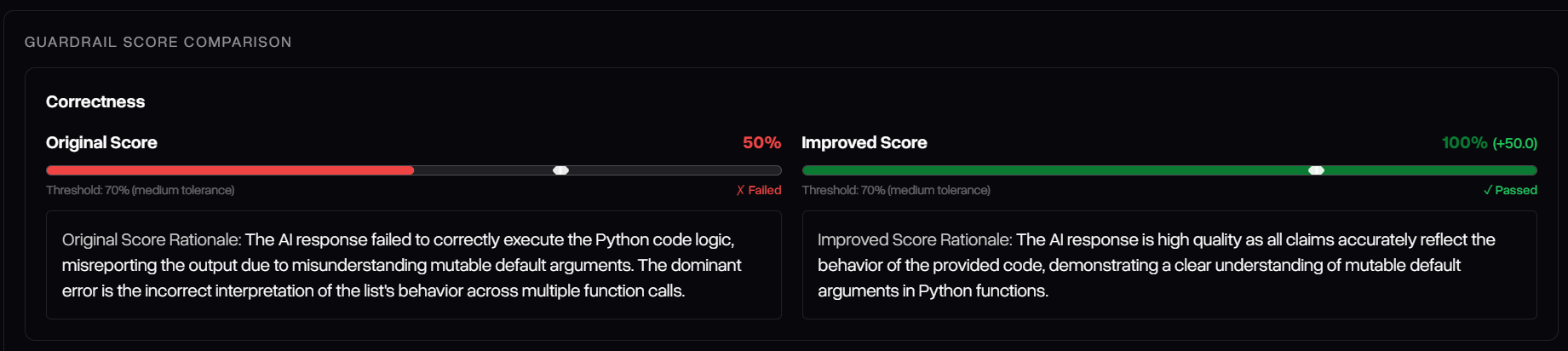
Similar to Defend Data, hallucinations in playground are highlighted in red, and when they occur, the scores for the improved output's evaluation in the failed metrics are displayed side-by-side with the original's.